> ## Documentation Index
> Fetch the complete documentation index at: https://docs.layerform.dev/llms.txt
> Use this file to discover all available pages before exploring further.
# Running the dev infrastructure
> Learn how to run the development infrastructure for the Elastic Stack using the layer definitions we've created.
In this final part of the tutorial you'll learn how to run the dev infrastructure for your Elastic Stack.
## Running a brand new environment with an Elastic Stack
You can use `layerform spawn elastic_stack my_layer` to spawn an instance of the `elastic_stack` layer whose ID is `my_layer`.
Given the `elastic_stack` layer depends on an instance of the `base` layer, `layerform` will take care of spawning a new one for you because there are no existing instances of the `base` layer. Then, it'll spawn your `elastic_stack` layer.
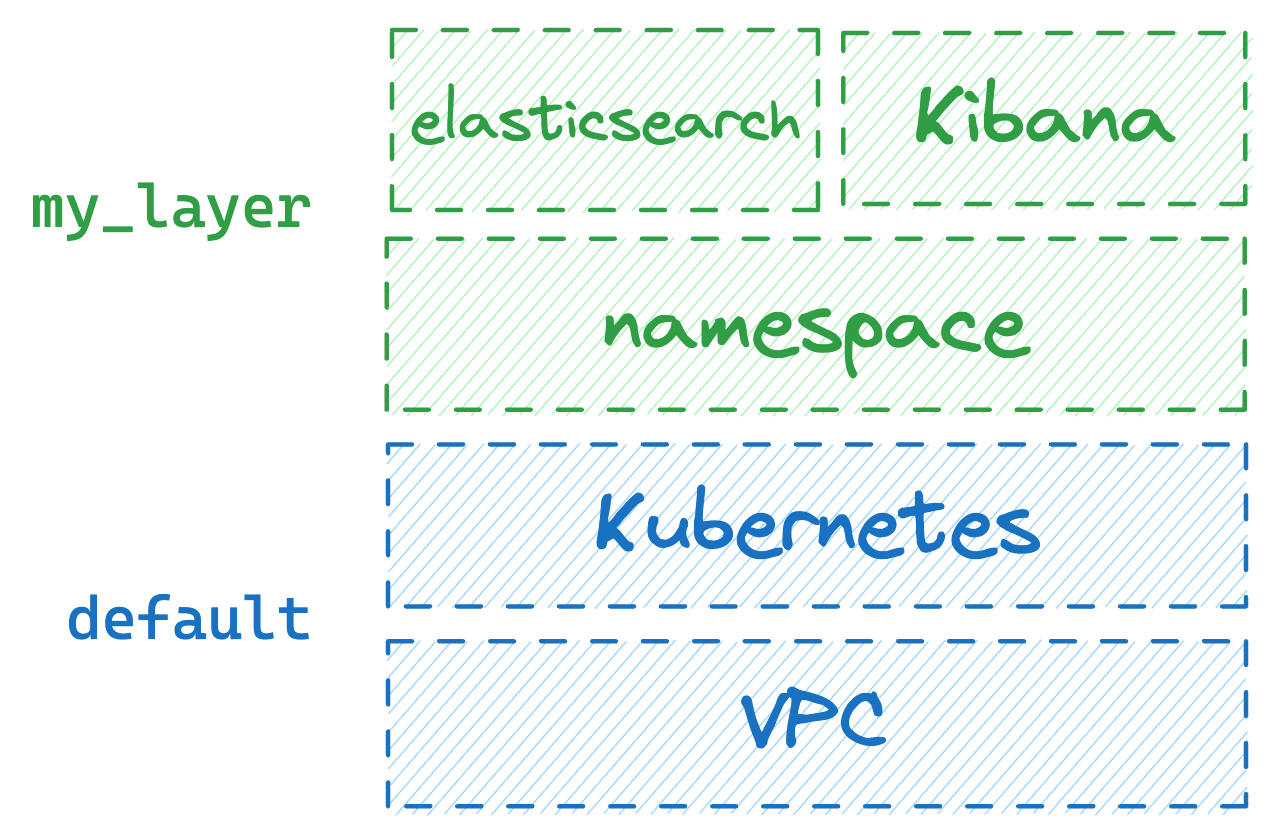 When spawning the first instance of the `base` layer, it'll receive the name `default`, because no other instances of the `base` layer existed before.
Now, if someone else in the team wants to spawn Elasticsearch and Kibana instances, they can run `layerform spawn elastic_stack another_layer` to create an instance of `elastic_stack` whose ID is `another_layer`.
In that case, an instance of the `base` layer with ID `default` will already exist. Therefore, Layerform will spawn the `elastic_stack` layer on top of it.
When spawning the first instance of the `base` layer, it'll receive the name `default`, because no other instances of the `base` layer existed before.
Now, if someone else in the team wants to spawn Elasticsearch and Kibana instances, they can run `layerform spawn elastic_stack another_layer` to create an instance of `elastic_stack` whose ID is `another_layer`.
In that case, an instance of the `base` layer with ID `default` will already exist. Therefore, Layerform will spawn the `elastic_stack` layer on top of it.
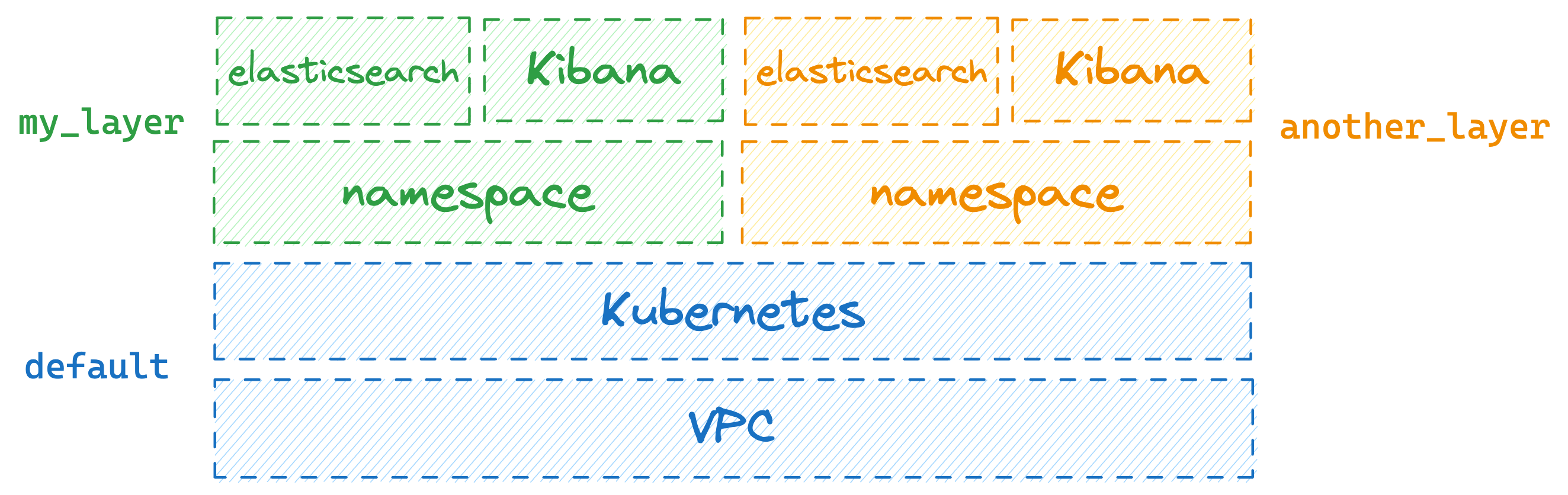 By default, Layerform will attempt to use underlying layers whose ID is `default`.
Whenever an underlying layer with ID `default` does not exist, Layerform will create one and apply the target layer on top of it.
## Destroying environments
To destroy your environment, you can use `layerform kill elastic_stack my_layer`. This command will cause Layerform to tear down the instance of the `elastic_stack` layer whose ID is `my_layer`.
By default, Layerform will attempt to use underlying layers whose ID is `default`.
Whenever an underlying layer with ID `default` does not exist, Layerform will create one and apply the target layer on top of it.
## Destroying environments
To destroy your environment, you can use `layerform kill elastic_stack my_layer`. This command will cause Layerform to tear down the instance of the `elastic_stack` layer whose ID is `my_layer`.
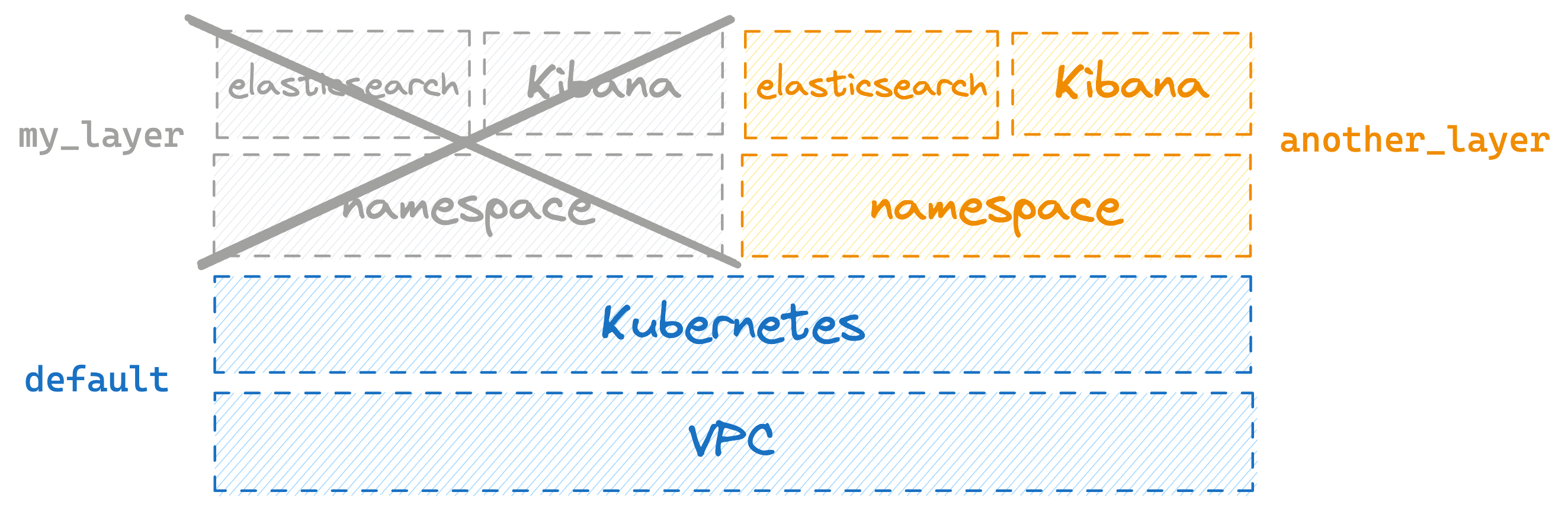 Now, see what happens when you try to destroy the `base` layer when there's still `another_layer` on top of it. If you try to do that by running `layerform kill base default` you'll see an error.
That error happens because you can only destroy a layer instance when no other instances depend on it.
To actually destroy the `base` layer with ID `default`, you must first destroy `another_layer` running `layerform kill elastic_stack another_layer`.
Now, see what happens when you try to destroy the `base` layer when there's still `another_layer` on top of it. If you try to do that by running `layerform kill base default` you'll see an error.
That error happens because you can only destroy a layer instance when no other instances depend on it.
To actually destroy the `base` layer with ID `default`, you must first destroy `another_layer` running `layerform kill elastic_stack another_layer`.
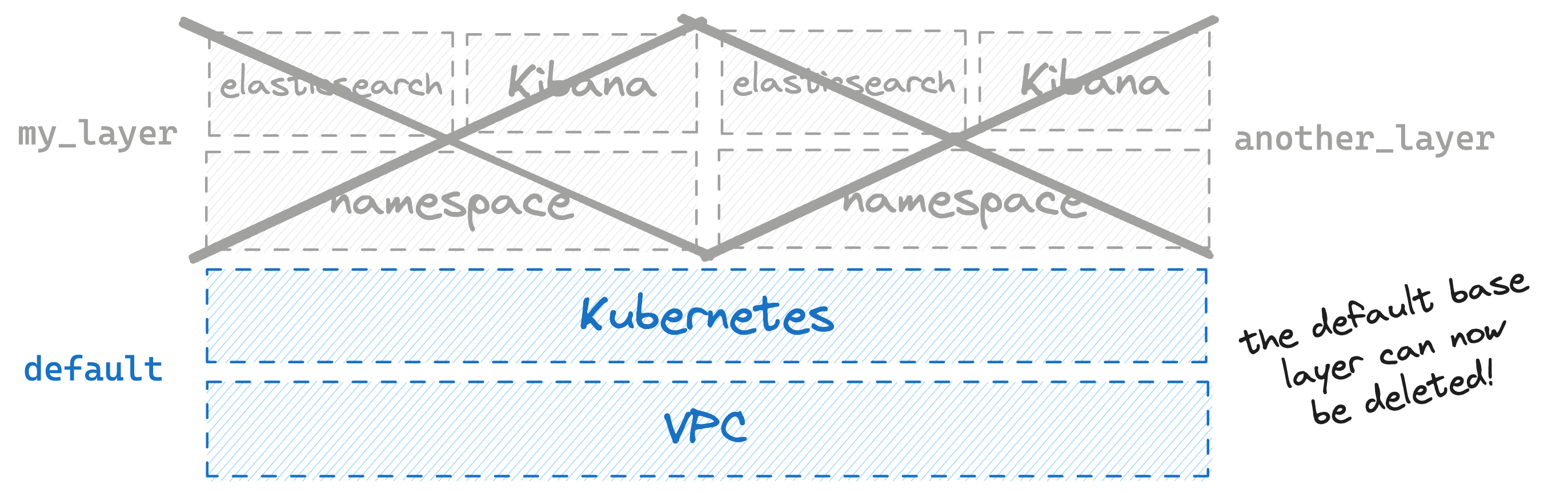 Only then you can run `layerform kill base default`.
## Using layers within a team
To use layers within a team, you must ensure that everyone in your team has configured their Layerform CLI to use the same back-end. That way, everyone will pull definitions from the same back-end. Additionally, they'll upload layer states there so that everyone in the team can see which layers exist.
For that, make sure to tell everyone to update their `~/.layerform/config` file and use the same back-end. Make sure to also give everyone permissions to read and write from that bucket, and [have their AWS credentials configured in their machines](https://docs.aws.amazon.com/cli/latest/userguide/cli-chap-configure.html).
Only then you can run `layerform kill base default`.
## Using layers within a team
To use layers within a team, you must ensure that everyone in your team has configured their Layerform CLI to use the same back-end. That way, everyone will pull definitions from the same back-end. Additionally, they'll upload layer states there so that everyone in the team can see which layers exist.
For that, make sure to tell everyone to update their `~/.layerform/config` file and use the same back-end. Make sure to also give everyone permissions to read and write from that bucket, and [have their AWS credentials configured in their machines](https://docs.aws.amazon.com/cli/latest/userguide/cli-chap-configure.html).