> ## Documentation Index
> Fetch the complete documentation index at: https://docs.layerform.dev/llms.txt
> Use this file to discover all available pages before exploring further.
# Back-ends and provisioning
> Learn what is a Layerform back-end and how to use and provision them.
A Layerform back-end is where Layerform stores layer definitions and the states for each layer instance.
There are two moments when you interface with a Layerform back-end. The first is when you provision the back-end with layer definitions.
The second is when a Layerform CLI user runs a `spawn` or `kill` command. Those commands cause the CLI to fetch layer definitions and the necessary pieces of state. The CLI will also update the state in the back-end when it changes.
## Types of back-ends
There are two types of back-ends: `local` and `s3`.
The `local` back-end means you will store state and layer definitions on disk.
The problem with using the `local` back-end is that other members of the team won't have access to your layer definitions and their state.
The `s3` back-end specifies the S3 bucket into which Layerform will store layer definitions and state.
By using an `s3` back-end you enable your whole team to fetch the definitions you provisioned. Additionally, your team can share core pieces of infrastructure because they will have access to shared state in the cloud.
## Provisioning (Configuration Step)
To provision a back-end, you must first specify the desired back-end in your `config.yml` file in the `~/.layerform` folder.
```yaml theme={null}
currentContext: example-context
contexts:
example-context:
type: s3
bucket: layerform-bucket-example
region: us-east-1
```
Then you should define layers using a `layers.json` file. This file has definitions for each layer, as shown below.
```json theme={null}
{
"layers": [
{
"name": "your_layer_name",
"files": [
"layers/example.tf",
"layers/example/main.tf",
"layers/example/input.tf",
"layers/example/output.tf",
"layers/example/variables.tf"
],
"dependencies": ["base_layer"]
}
]
}
```
Now, run `layerform configure` to provision these layers to your S3 bucket.
 Please create a bucket exclusively for Layerform when using an S3 bucket as a back-end.
Layerform should always have its own bucket for storing layer states and definitions. Otherwise, it may overwrite existing files.
## Using (Usage Step)
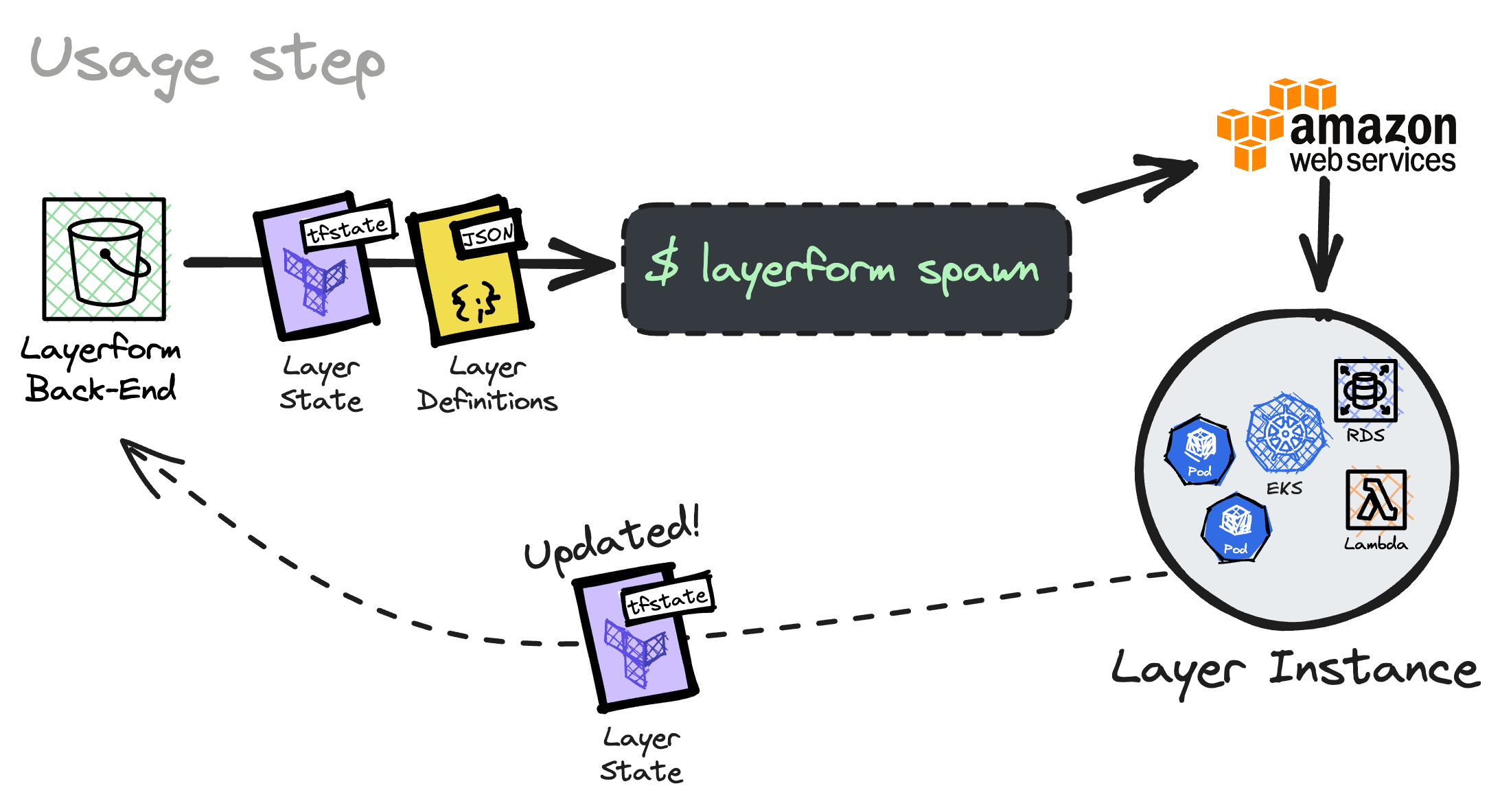
Users directly interface with the back-end when they run `layerform spawn` and `layerform kill`.
Those commands cause the Layerform CLI to fetch state and layer definitions from the back-end so it knows which Terraform files to run.
After running the Terraform files necessary to create an instance of the desired layer definition, Layerform will upload the updated layer state to your back-end.
## Configuration
To configure your CLI to use a particular back-end, you must remember to update the `config.yaml` file within `~/.layerform` so it pulls and writes data to the correct place.
To use an S3 bucket, you must add a `context` entry whose `type` is `s3`. That entry must specify the bucket's name under the `bucket` key.
Then, you should set `currentContext` to the name of your S3 context, as shown below.
```yaml theme={null}
currentContext: remote-context
contexts:
remote-context:
type: s3
bucket: layerform-bucket-example
region: us-east-1
```
Please create a bucket exclusively for Layerform when using an S3 bucket as a back-end.
Layerform should always have its own bucket for storing layer states and definitions. Otherwise, it may overwrite existing files.
### Using the local filesystem
To use the local filesystem back-end your `context` entry must use the type `local` and specify the directory containing your layer definitions and state.
```yaml theme={null}
currentContext: my-local-context
contexts:
my-local-context:
type: local
dir: /Users/someone/project/layerform-backend
remote-context:
type: s3
bucket: layerform-bucket-example
region: us-east-1
```
Please create a bucket exclusively for Layerform when using an S3 bucket as a back-end.
Layerform should always have its own bucket for storing layer states and definitions. Otherwise, it may overwrite existing files.
## Using (Usage Step)
Users directly interface with the back-end when they run `layerform spawn` and `layerform kill`.
Those commands cause the Layerform CLI to fetch state and layer definitions from the back-end so it knows which Terraform files to run.
After running the Terraform files necessary to create an instance of the desired layer definition, Layerform will upload the updated layer state to your back-end.
## Configuration
To configure your CLI to use a particular back-end, you must remember to update the `config.yaml` file within `~/.layerform` so it pulls and writes data to the correct place.
To use an S3 bucket, you must add a `context` entry whose `type` is `s3`. That entry must specify the bucket's name under the `bucket` key.
Then, you should set `currentContext` to the name of your S3 context, as shown below.
```yaml theme={null}
currentContext: remote-context
contexts:
remote-context:
type: s3
bucket: layerform-bucket-example
region: us-east-1
```
Please create a bucket exclusively for Layerform when using an S3 bucket as a back-end.
Layerform should always have its own bucket for storing layer states and definitions. Otherwise, it may overwrite existing files.
### Using the local filesystem
To use the local filesystem back-end your `context` entry must use the type `local` and specify the directory containing your layer definitions and state.
```yaml theme={null}
currentContext: my-local-context
contexts:
my-local-context:
type: local
dir: /Users/someone/project/layerform-backend
remote-context:
type: s3
bucket: layerform-bucket-example
region: us-east-1
```